
Turn everyday jobs into local search content for your target neighborhoods.
Pull finished jobs and photos straight from your CRM, or add them in your client portal. RankRadius turns each one into an AI-written, neighborhood-level project write-up on your own website: fresh local content, showing the work you actually do where you do it.
Illustration with sample data
- AI-written project write-ups
- Neighborhood-level map pins
- Google reviews matched to jobs
- Jobs from your CRM or the portal
- Facebook & Instagram posting via Zapier
- You approve everything first
- Month-by-month proof of the work
- Calls, clicks and directions from Google
- A daily Google listing check, with email alerts
From completed jobs to fresh local content, without extra marketing work.
Direct CRM or Portal Intake
Pull jobs and photos straight from your CRM, connected directly or through Zapier or Make, or add a job and its photos in your client portal.
AI & Geo Expansion
RankRadius turns the short field note into a roughly 150-word local write-up and places the job at neighborhood level, so the map never points to a customer’s house.
Review, Approve & Publish
You read it, edit anything you like, and approve it from your dashboard. It goes live on your website right away, as fresh, location-specific content, with structured data search engines can read, and one more click posts it to your Facebook and Instagram.
Every approved job becomes another reason to be found, and another reason to be trusted.
RankRadius isn’t a one-time redesign. It builds up local content and social proof every time you approve a completed job.
A growing library of local write-ups
Every approved job adds a new, neighborhood-anchored write-up to your site, in the place-specific wording homeowners use when they search, rather than another generic services page.
Real reviews next to the real work
A confirmed Google review shown right next to the job it’s about can be more convincing than a review page on its own, because it appears while a prospect is comparing you to competitors.
Grows job by job
There’s no campaign to plan or content calendar to keep up with. Every job your crew finishes can become another write-up, another neighborhood covered, another reason to click, once you approve it.
A short field note, expanded into a local project write-up.
"Performed roof repair after storm damage. Realigned and cleaned gutters on Fox Glen."
Storm damage repaired and gutters back in line for a home in the Fox Glen area of Michiana. After a recent storm, our team repaired the damaged section of roof, then realigned and cleaned the home’s gutters so rainwater flows where it should again. Taking care of both in one visit means the homeowner is ready for the next round of weather without a second appointment. If your Fox Glen home took a hit in the latest storm, our local crew can take a look.
An illustrative example: the neighborhood and details are made up. Every write-up waits for your approval, and you can edit any of it.
Everything you need to turn finished work into local proof.
Neighborhood Snapping
Project pins snap to the center of the job's neighborhood and are then shifted slightly at random, so no pin ever points at a customer's actual house — while still capturing subdivision-level searches.
AI SEO Engine
Turns short field notes into roughly 150-word, location-aware write-ups built around the neighborhood where the work was done — instructed to use only the facts in your note, and reviewed by you before anything is published.
Matched Google Reviews
Syncs your 4- and 5-star Google Business Profile reviews and suggests likely job matches by customer name and timing. You confirm before it's public.
Direct CRM Sync & Portal Upload
Sync completed jobs and photos straight from your CRM, connected directly or through Zapier or Make, or add them in the client portal. No new app for your crew to learn.
1-Click Social Posting
Send an approved job’s photo and caption to Instagram and Facebook with one click, through a Zapier connection you set up once.
Drop-in Website Widget
Works on WordPress, Squarespace, Wix, Webflow, or custom HTML. Paste one short snippet onto your site (your client portal gives you the exact code, with step-by-step guides) and new jobs appear as you approve them.
A dashboard that shows what’s happening
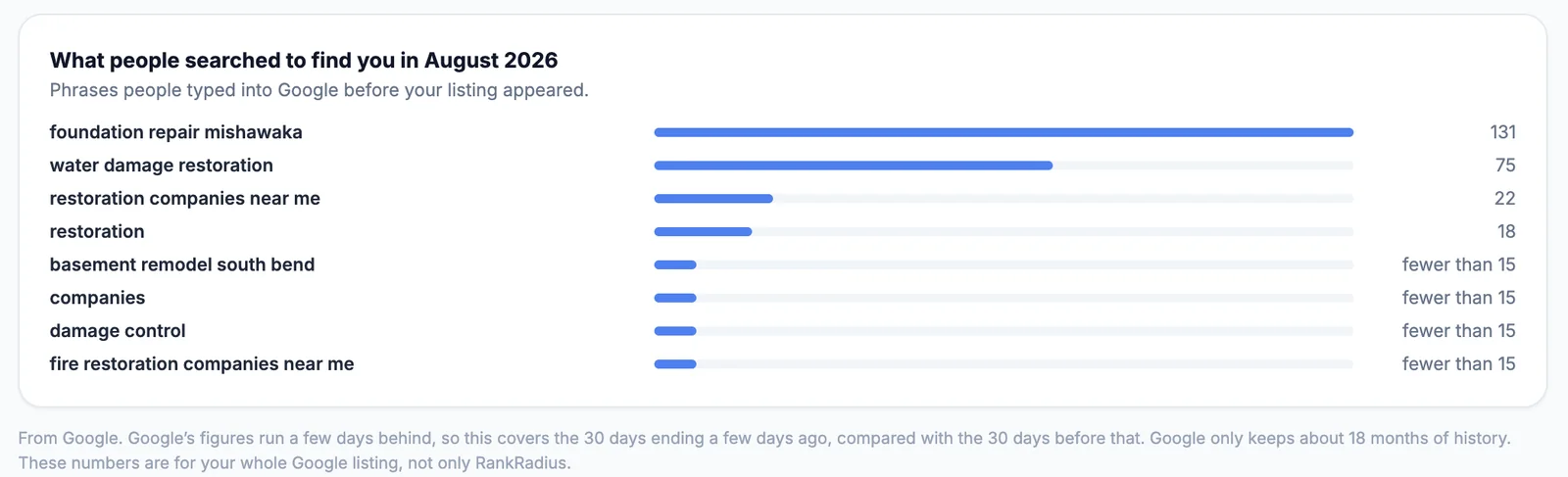
Every month, see the jobs you published, the neighborhoods you reached and the reviews you showcased. Connect your Google Business Profile and see how many people called, visited your website or asked for directions, the searches they used to find you, a daily check that your hours, phone number and address look right, and an email if Google suggests changes to your listing. Connect Search Console too, at no extra cost, to see how people find your website, and print or save a copy of the dashboard as a PDF. See the dashboard.
See what your work and your Google listing are doing, in one place.
RankRadius doesn’t just publish and go quiet. Your portal shows you how people are finding you on Google, the work month by month, and whether anything on your listing needs a look.
Swipe sideways to see the whole panel.
Calls, clicks and directions
See how many people called, visited your website or asked for directions from your Google listing, against the 30 days before, and the exact phrases they searched to find you.
Every month, laid out plainly
The jobs that went live, the neighborhoods you reached for the first time, the photos and the Google reviews you showcased. A quiet month says so, so you always know where things stand.
A daily check on your listing
Your hours, phone number, address and website are checked every day against your own details and your website’s homepage, and your review count and rating are tracked. If Google suggests changes to your listing, we email you.
How people find your website
Connect Google Search Console and see how often your website appeared in Google searches and was clicked, against the 30 days before, the phrases people searched, and which of the neighborhoods you’ve published showed up in those searches.
A report you can hand to someone
Print a clean copy of your dashboard, or save it as a PDF, whenever a partner, an accountant or anyone else asks how it’s going.
The Google figures and the listing check use your Google Business Profile, which you connect once in your portal’s Settings. Search Console connects separately, when you’re ready, at no extra cost. The month-by-month work list and your website activity don’t need either.
Google can suggest changes to your listing, and they’re easy to miss.
Google, and sometimes the public, can suggest changes to your hours, phone number or address, and edits like these can change what customers see on your listing before you notice.
An example: a suggested edit changes your Saturday hours to “Closed.” Nobody on your team notices, and people who search on a Saturday see a business that looks shut. With RankRadius the suggestion appears in your dashboard and we email you, so you can review it and fix your listing before it costs you a call.
- Phone number matches your profile
- Address matches your profile
- Your website’s homepage shows your phone number
- Google suggested changes to your business hours. Review them in your Google Business Profile.
Recent changes
Google’s figures come from Google, run a few days behind, and cover your whole listing, not only RankRadius. We show them next to your published work, not as proof that one caused the other, and we don’t promise rankings or new customers. The listing checks compare your Google listing, your RankRadius profile and your website’s homepage; other directories such as Yelp or Facebook aren’t checked.
Built by a local developer who works with the trades.

Joe Hollenbach
Founder, Michiana Dev LLC
I’m a software engineer in the South Bend area, and I specialize in building websites and software solutions for small businesses. My clients in the trades wanted a better way to show off the work they do and steadily build their sites’ local search presence, without having to write up every job themselves. That’s why I built RankRadius.
RankRadius comes from Michiana Dev, my web design and software studio. Questions go straight to me.
Built for any business that shows up and does the work on-location.
Pick your trade to see how RankRadius works for businesses like yours.
What it takes to cover $399 a month.
RankRadius is $399 a month, about $4,800 a year. For many on-location trades that’s one larger job, or a handful of regular customers, over a whole year. Here are a few examples; every trade page has its own.
One roof replacement
At $8,000, one roof that started with someone finding your project write-ups covers a full year. See the roofing page.
One furnace or AC replacement
At $6,000, one replacement that started with someone finding your project write-ups covers a full year. See the HVAC and plumbing page.
Two regular customers
Two customers on a $150 every-other-week schedule bring in about $7,800 a year. See the cleaning page.
You don’t have to take our word for it
Every month your Performance dashboard shows how many people called, visited your website or asked for directions from your Google listing, next to the jobs you published and the neighborhoods you reached. You can see what you’re paying for and decide for yourself whether it’s paying for itself. See the dashboard.
Example figures to show the math, not a prediction: your prices and jobs will differ, and we don’t promise rankings or new customers.
Common questions
How much of my time does this take?
Very little. We set up your account and your preview with you, and give you a short snippet to add to your website. After that, each finished job waits in your Job Queue with its draft write-up and photos, so approving one is a quick read and a click. Nothing is published until you approve it, and you can work through the queue whenever things slow down.
Do I need Albi, or a particular CRM?
No. If you use Albi, RankRadius can connect to it directly and pull in finished jobs and photos. Many other CRMs and booking tools that work with Zapier or Make can send finished jobs over. And you can always add a job and its photos yourself from your client portal, on a computer or your phone.
Who writes the content, and can I change it?
RankRadius drafts each write-up with AI from your field note, and it’s instructed to use only the facts in that note, never inventing prices, brands, warranties or credentials. You can edit the note or the write-up, regenerate it, and choose which photos appear. Nothing goes live until you approve it.
Will the map show my customers’ homes?
No. Every pin is placed at the center of the job’s neighborhood and then shifted slightly at random, so it never points at a house. Write-ups are instructed to name the area, not the street (street addresses are also removed from your note before the AI sees it), and location data is removed from uploaded photos.
What website platforms does it work with?
WordPress, Squarespace, Wix, Webflow and custom HTML. You paste one short snippet onto a page, and your client portal gives you the exact code with step-by-step instructions. After that, every job you approve appears automatically.
Can it post my jobs to Facebook and Instagram?
Yes. Once a job is approved, one click sends its photo and a short caption, with hashtags from the job’s work types, to your Facebook Page and Instagram business account. It runs through a Zapier connection you set up once in your own Zapier account, so your social accounts stay entirely yours. Settings has a test button to check it works.
How will I know it’s working?
Your client portal’s Performance tab shows the jobs and neighborhoods published each month. Once you connect your Google Business Profile, it also shows how many people called, visited your website or asked for directions from your listing, compared with the month before, plus the searches they used to find you. It checks your Google listing every day, flags it if your hours, phone number or address look inconsistent, and emails you if Google suggests changes. If you also connect Google Search Console, which is included in your subscription, it shows how often your website appeared in Google searches and was clicked, and which of your neighborhoods showed up in those searches. You can print the dashboard or save it as a PDF. Google’s figures run a few days behind and cover your whole listing or website, not only RankRadius, and we don’t promise rankings or new customers. We show you what’s happening so you can judge it for yourself.
Do you guarantee I’ll rank higher on Google?
No, and you should be wary of anyone who does. Search engines decide rankings, and nobody controls them. What RankRadius does is keep adding real, specific write-ups about your work in the neighborhoods you serve, with photos and confirmed reviews, to your own website, every time you approve a job.
How much does it cost, and is there a contract?
$399 a month, with no setup fee and no long-term contract. Your subscription renews monthly until you cancel, and you can cancel any time from Settings → Billing in your portal. It ends at the end of the period you’ve already paid for.
Does it work for my kind of business?
If you do the work at your customer’s location, almost certainly. See how it works for roofing, HVAC and plumbing, tree service and landscaping, pest control and the other trades above, or tell us about yours.
See the real widget running live on a page.
Explore the actual map and project feed your customers would see, running on a sample business.
Get your free preview.
Tell us what you do and where you work, and we’ll build a private preview of RankRadius from your own recent jobs, free and with no commitment.
Need a new website too, not just more visibility for the one you have?
RankRadius is built and operated by Michiana Dev, a small web design and development studio. If your current site is outdated, slow, or wasn’t built with local SEO in mind, we can design and build a new one for your business — and connect it to RankRadius from day one.